
Choose the Correct Muhasib Activation Path
How to Choose the Correct Muhasib Activation Path in Muhasib ERP
Overview
This guide will help you select the activation path that matches the subscription and terminal you are authorized to use.
Muhasib advances to the next allowed lifecycle state or preserves the current state for safe diagnosis; the verification section identifies the expected result.
Who can do this
You need access to Use requires the rights and business authority described by the workflow. Database, licence, user, company, or system changes require the responsible administrator.
Before you start
Confirm who owns the subscription, whether this computer is the primary or an more terminal, and whether the database belongs to a new or existing Muhasib workspace.
Where to find it
Follow the launch, wizard, login, company-selection, Back Office, or power path described in the procedure; the available starting screen depends on current installation state.
Choose the Correct Muhasib Activation Path
Step 1: Identify the current lifecycle state and intended outcome
Step 2: Follow the decision or safety guidance already described in this article
to achieve?
|
New
Activation
↓
Path A
|
Existing
Database
↓
Path B
|
Other
Scenario
↓
Path C
|
Step 3: Perform the selected action once
Step 4: Verify the resulting screen, identity, and state before continuing
Check your work
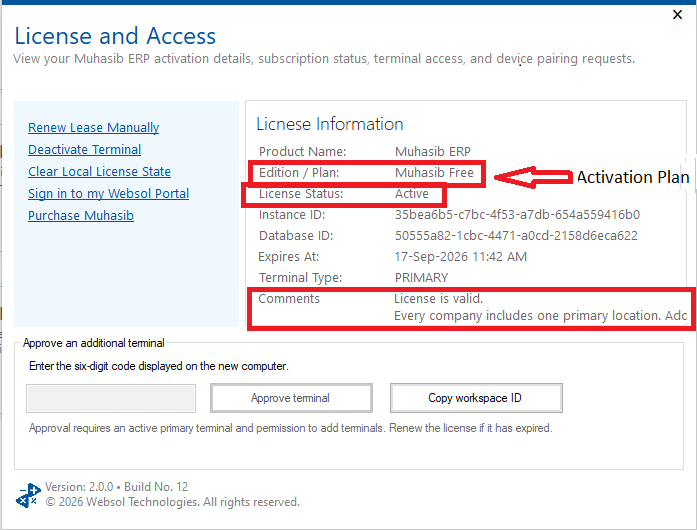
After activation, Licence Information should show the expected plan/status, database identity, instance identity, and terminal type. Continue only if they match the intended deployment.
If something goes wrong
If the expected result is not shown, stop repeated attempts, check the active database/workspace/user/licence context, preserve the exact message, and follow the related recovery article.
Related guides
- Activate Muhasib Free
- Activate an Existing Muhasib Subscription
- Transfer Primary Muhasib Access to This Computer
- Activate an Additional Muhasib Terminal
- Review and Maintain Muhasib Licence Access