
Create a New Muhasib Database
How to Create a New Muhasib Database in Muhasib ERP
Overview
This guide will help you create a new empty Muhasib database for a new workspace on an approved SQL Server.
The available build creates the fixed database name MUHASIB, applies its base script in batches, and saves the new connection in local workstation settings. Creation changes SQL Server state and may leave a partial database if interrupted; verified rollback behavior is still required.
Who can do this
You need access to Database-creation rights on a non-production or approved SQL Server. This procedure must not be used to repair or replace an existing company database.
Before you start
Make sure a database named MUHASIB does not already contain required data. Understand the organization's backup, server naming, collation, security, and recovery policies.
Where to find it
Follow the launch, wizard, login, company-selection, Back Office, or power path described in the procedure; the available starting screen depends on current installation state.
Create a New Muhasib Database
Step 1: Open Database Setup
Step 2: Select the approved SQL Server and authentication method
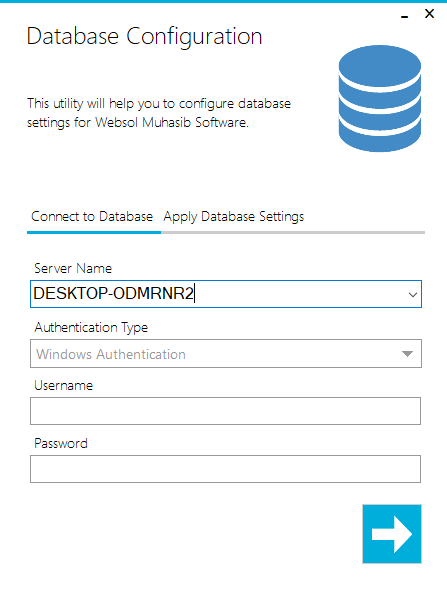
Step 3: Enter SQL credentials only when SQL authentication is required
Step 4: Verify that you are connected to the intended server
Step 5: Choose Create new Database
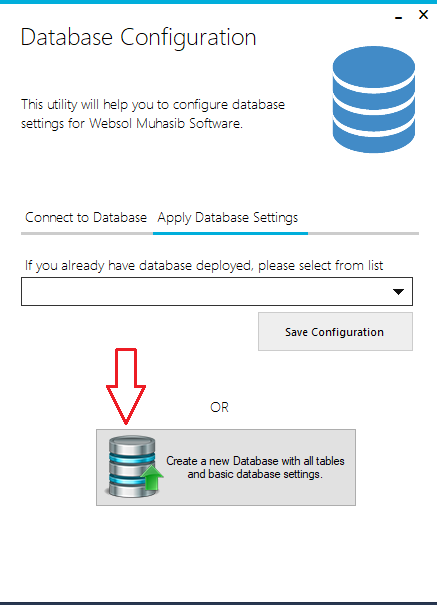
Step 6: Allow Muhasib to create MUHASIB and execute its embedded base
Allow Muhasib to create MUHASIB and execute its embedded base database script.
Step 7: Do not close the application or interrupt SQL Server while
Do not close the application or interrupt SQL Server while creation is in progress.
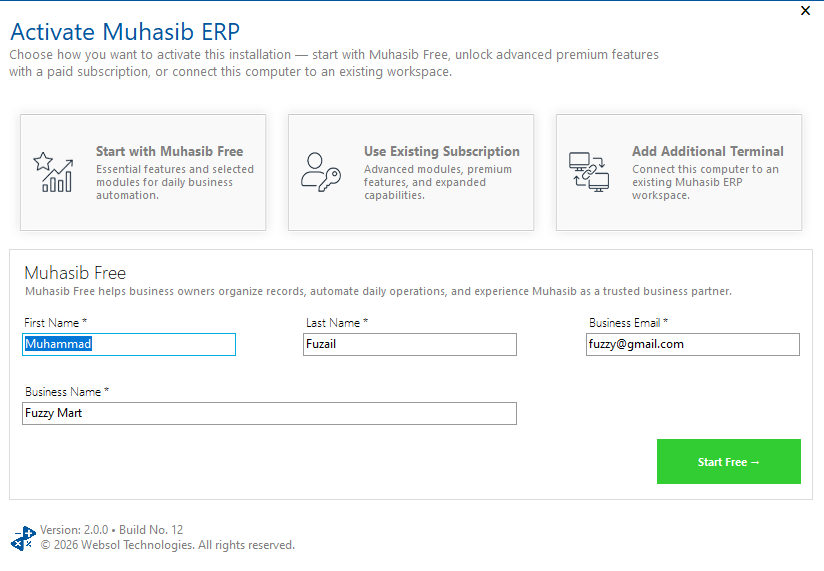
Step 8: After completion, continue to activation and first-company onboarding
Check your work
Make sure Muhasib reconnects successfully, recognizes the expected database revision, and opens activation or onboarding. A database existing in SQL Server is not enough proof; the application must initialize it successfully.
If something goes wrong
- If
MUHASIBalready exists, do not overwrite or remove it. Confirm its owner and purpose. - If permissions fail, have the database administrator create or authorize the database through the supported deployment process.
- If creation stops partway, preserve logs and contact support before retrying or cleaning up.
Related guides
- Connect Muhasib ERP to an Existing Database
- Choose the Correct Muhasib Activation Path
- Create the First Company Workspace
- Create and Verify a Manual Backup